Documenting shellscripts
If you have a look at the typical posts in this blog you will see quite a few about documenting stuff. In fact there are so many, I kind of surprised by myself, that I’ve managed to find another piece I’d like show you.
Actually I’ve thought shellscripts aren’t the stuff you’d expect to see in a general documentation, but then there are projects like Bats and Shunit2. So when some people even spend time to write complete test harnesses to keep everything at bay, we, you and I, probably don’t have to feel guilty if we proceed here.
Why? &
Lately, I am working on a monitoring script, which to everyone’s surprise, exploded feature-creepy-wise and I had to rename/split it several times, just to limit the damage on impact.
And as the eager adept of writing documentation-as-code that I am, I carefully drafted all documentation into the living body of the scripts and honed them to perfection. Unfortunately and I’ve probably probably mentioned in dozen of times in every other post here, there is always the problem to provide the right type of documentation, to the right audience at the right place.
Thankfully this time the right audience is us developers and we just postpone the whole Confluence[1] mess for gloomier times, when we actually want to impress stakeholders.
Are you up to this adventure?
Doxygen all the things &
Doxygen is generally a good starting point for every documentation approach, even more when the targeted language is among the supported languages of the project.
Doxygen offers simple commands to properly describe variables, function bodies and
also complete files with every copyleft and $ID$ information of your heart’s desire.
I am quite certain you know them by heart, but let us quickly refresh our memory, so we are on the same page:
 /** main
  * @brief Main function (1)
  *
  * @details (2)
  * Handles the main stuff
  *
  * @startuml (3)
  * main.c -> lang.c : get_lang()
  * @enduml
  *
  * @param[in]  argc  Number of arguments (4)
  * @param[in]  argv  Array with passed commandline arguments (5)
  * @retval  0  Default return value (6)
  **/

 int main(int argc, char *argv[]) {

    printf("Hello, %s", get_lang("NL"));

    return 0;
}-
@briefis basically the headline of the block - so mostly the name of the function goes here -
Obviously,
@detailsis intended to be more verbose, so feel free to add some prosa here -
This is a nice combination of sorts and allows to embed PlantUML diagrams[2]
-
Next up are parameters with
@paramand also aa nice indication of the direction of access. There aren’t enough languages with pointers, so I am afraid just want to use it for the looks -
And finally the return value - which can be either verbose value by value or you can use just
@returnand describe what is to be expected there
| There are different ways to prefix the commands: The default is probably with a leading / ( backslash), but I prefer the @-version from Javadoc |
So with fresh memory let us quickly draft our Doxygen config:
# Input/Output
INPUT             = src
OUTPUT_DIRECTORY  = doxygen
FILE_PATTERNS     = *.c *.h *.sh (1)

# Special handling for shellscripts (2)
EXTENSION_MAPPING = no_extension=c
EXTENSION_MAPPING = sh=c

# Generators
GENERATE_HTML     = YES
GENERATE_LATEX    = NO
GENERATE_XML      = YES

# Project based
PROJECT_NAME      = showcase-asciidoxy
JAVADOC_AUTOBRIEF = YES (3)
JAVADOC_BANNER    = YES
#RECURSIVE         = YES
EXTRACT_ALL       = YES (4)

# Trick to force Doxygen not to ignore plantuml (5)
PLANTUML_JAR_PATH = /usr/share/java/plantuml.jar| 1 | I like to suffix my shellscripts with .sh, just to distinguish them from ordinary binaries,
so we need to add this to our pattern list |
| 2 | Another trick up in our sleeves is the EXTENSION_MAPPING, which allows us to tell Doxygen to
treat unknown extension/files with no extension at all like C-files |
| 3 | Yes, yes! Give us the fully Javadoc experience! |
| 4 | We just add EXTRACT_ALL as well to avoid nasty surprises later on |
| 5 | And we also directly pin the PlantUML path, you never know |
And once we run Doxygen, we can see loads of text flying buy. Too fast? I’ve highlighted the interesting bits for us:
$ podman run --rm -v /home/unexist/projects/showcase-documentation-asciidoxy:/asciidoxy \
	-it docker.io/unexist/asciidoxy-builder:0.4 \
	sh -c "cd /asciidoxy && doxygen"
Adding custom extension mapping: 'sh' will be treated as language 'c'
Doxygen version used: 1.13.2
...
Parsing files
Preprocessing /asciidoxy/src/build.sh...
Parsing file /asciidoxy/src/build.sh...
...
Generating file documentation...
Generating docs for file src/build.sh...
...
Generating XML output...
Generating XML output for file build.sh
...
finished...
Looks like Doxygen found our shellscript, threw in a bit of pre- and postprocessing and generated some output for us:
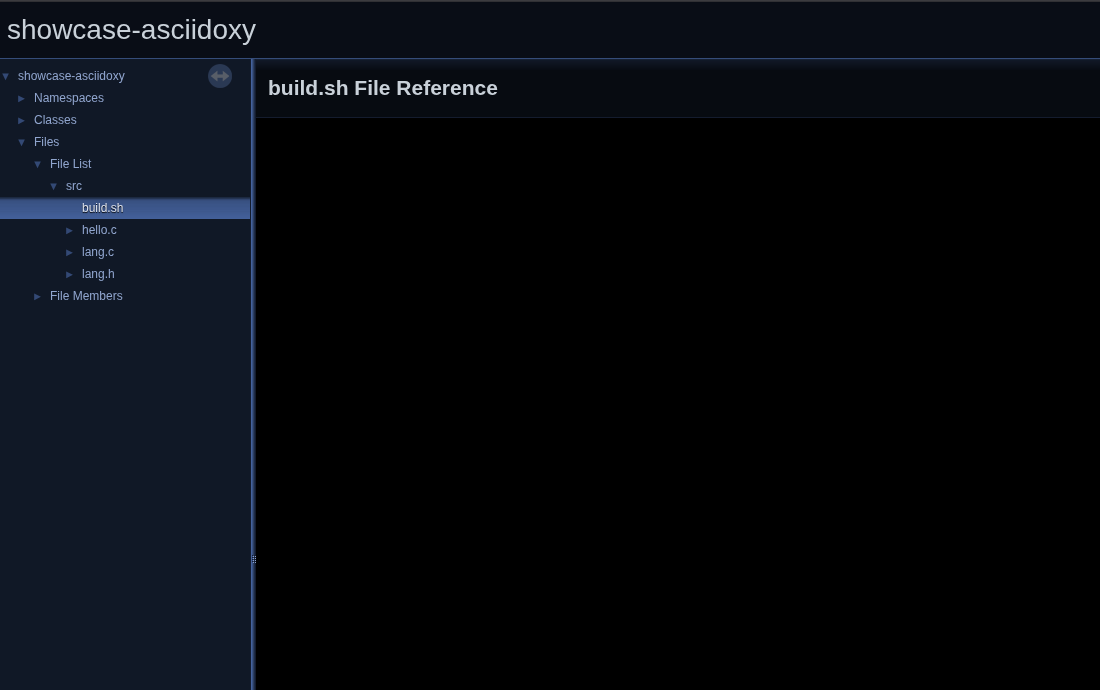
Well.. Remember when I told you Doxygen works best with supported language? Clearly this isn’t the case here.

Fairly good question and thanks for asking - time for our own sorts of preprocessing.
Preprocessing from hell &
I suppose the people behind Doxygen got lots of requests for fancy and esoteric languages, so many in fact, I suppose they couldn’t keep up or were just satisfied with C. Whatsoever, they’ve added input filters, which allow to prepare files before Doxygen tries to make sense of them.
Gladly I am not the first one with this kind of special interest and there is in fact a quite old Github project, which provides the filter script of our dreams:
I am not sure, if the name of the user or the used license is of any significance, but the whole this was written in sed - yes just sed[3], but the FAQ brings everything into perspective:
Q. Dude. sed ? Seriously ? A. Are you.. Jealous ?
Messing with this script was a thrill-ride and highly educative. In fact, I didn’t know sed can be used in such a way and it felt a bit how I use awk.[4]
Quick litmus-test: If YOU can read this please contact me to write a proper explanation what this actually does:
/## \+@fn/{ (1)
    s/  \+/ /g¬
    /@param [^ ]\+ .*$/{
        s/\(@fn [^(\n]\+\)(\([^(]*\))\(.*\)\(@param \)\([^ \n]\+\(\.\.\.\)\?\)\([^\n]*\)$/\1(\2, \5)\3\4\5\7/¬
    }
    / *\(function \+\)\?[a-z:.A-Z0-9_]\+ *() *{ *$/!{
        N
        b step
    }
}| 1 | I’ve omitted all comments to increase the dramatic effect! |
For the time being we just accept the script as-is, pretend we totally understand how it works and treat it like AI-generated code and run it - --yolo:
$ doxygen/filter/doxygen-bash.sed src/build.sh | grep .
//! @package showcase_asciidoxy
//!
//! @file build.sh
//! @copyright 2026-present Christoph Kappel <christoph@unexist.dev>
//! @version $Id: _posts/2026-04-29-documenting-shellscripts.adoc,v 1438 1777470090.0-7200 unexist $ (1)
//!
//! This program can be distributed under the terms of the Apache License.
//! See the file LICENSE for details.
//! Selected compiler
UpperCase String CC = clang        ; (2)
//! Name of the created binary
UpperCase String BIN_NAME = hello  ;
//! @fn void wildcard(void arg1) (3)
//! @brief Get all files by wildcard mask
//! @param[in] arg1 Pattern to use (e.g. "*.c")
wildcard(void arg1) { } (4)
//! @fn void compile()
//! @brief Compile program
compile() { }| 1 | $ID$ - see? |
| 2 | This is just the way of telling Doxygen this is an uppercase variable of the type string |
| 3 | This might be a bit weird, but the processing further down the pipeline requires C-definitions and they don’t cause any harm here, do they? |
| 4 | Oh and we better strip the function bodies - less confusion for Doxygen is more good! |
This looks rather good, so let us quickly hack this into our Doxyfile:
$ head -n9 Doxyfile
# Input/Output
INPUT             = src
OUTPUT_DIRECTORY  = doxygen
FILE_PATTERNS     = *.c *.h *.sh

# Special handling for shellscripts
EXTENSION_MAPPING = no_extension=c
EXTENSION_MAPPING = sh=c
FILTER_PATTERNS   = *.sh=doxygen/filter/doxygen-bash.sed
And after a quick run we are greet by this:
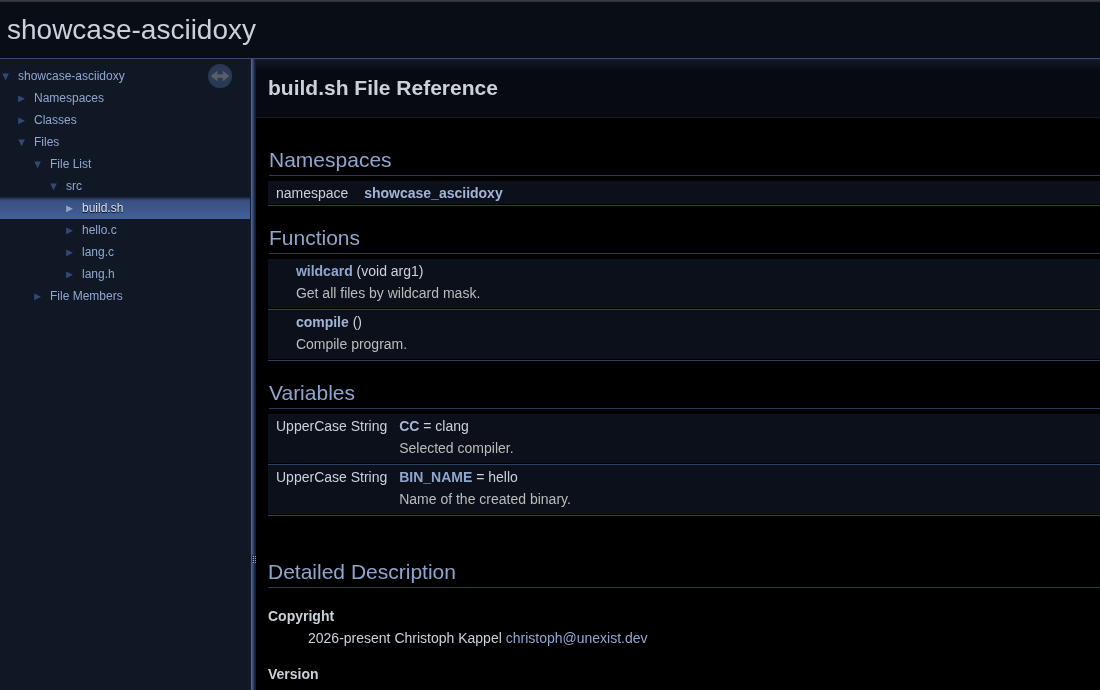
Splendid - time to move to our grande finale!
Grande finale &
I think most of you have see on a previous post (like Bringing documentation together) what follows next, therefore we keep it short and sweet.
Equipped with the generated XML nothing can stops us from piping this through AsciiDoxy, besides the expired SSL cert, but since I am a dutiful host tonight, here is a fork for you along with small patches of the original repository.
Like I’ve lined out in the mentioned post, AsciiDoxy basically parses the xml structure and provides a bunch of macros to the AsciiDoc render pipeline. This allows us to reference the named functions and variables like this:
=== Variables

${insert("CC", leveloffset=3, template="shellvariable")} (1)
${insert("BIN_NAME", leveloffset=3, template="shellvariable")}

=== Helper functions

${insert("wildcard", leveloffset=3, template="shellfunc")} (2)
${insert("compile", leveloffset=3, template="shellfunc")}| 1 | Somehow there is no template available by default for variables, but fortunately AsciiDoxy let us provide our own. |
| 2 | Almost the same is true for functions: They can be rendered with the typical method template, but there is much to be desired and we provide our own version as well. |
How the templates are stitched together isn’t exactly a trade secret, but there is documentation[5] missing and the best source is the actual code:
I came up with this for variables, but I am sure you are way more creative with Mako templates and can easily outclass me and let me look like an amateur:
<%!
from asciidoxy.generator.templates.helpers import h1
from asciidoxy.generator.templates.cpp.helpers import CppTemplateHelper
from html import escape
%>

[#${element.id},reftext='${element.full_name}']
${h1(leveloffset, element.name)}
${api.inserted(element)}

${element.brief}

${element.description}
Unfortunately, if we just run AsciiDoxy now it fails loud and horribly:
$ podman run --rm -v /home/unexist/projects/showcase-documentation-asciidoxy:/asciidoxy \
        -it docker.io/unexist/asciidoxy-builder:0.3 \
        sh -c "cd /asciidoxy && mvn -f pom.xml generate-resources"
...
ERROR: Error while processing AsciiDoc files:
Cannot find any CC for any
Traceback:
  File index.adoc, line 16, in AsciiDoc
    ${insert("CC", leveloffset=3, template="shellvariable")}
  File /usr/lib/python3.12/site-packages/asciidoxy-0.8.7-py3.12.egg/asciidoxy/generator/asciidoc.py, line 140, in _wrapper
    ret = f(*args, **kwargs)
  File /usr/lib/python3.12/site-packages/asciidoxy-0.8.7-py3.12.egg/asciidoxy/generator/asciidoc.py, line 283, in insert
    return self.insert_fragment(self.find_element(name,
  File /usr/lib/python3.12/site-packages/asciidoxy-0.8.7-py3.12.egg/asciidoxy/generator/asciidoc.py, line 608, in find_element
    raise ReferenceNotFoundError(name, lang=lang, kind=kind)
make: *** [Makefile:36: asciidoxy] Error 1
The short explanation for this is AsciiDoxy has some built-in checks for naming of files and hence
inexplicably expects files to come with a .c file extension.
This has to be done multiple times in multiple places, but if we aren’t experts on sed by now..
$ make doxygen-fix-shellscripts
sed -i -e 's/location file="\([^"]*\)"/location file="\1.c"/g' doxygen/xml/*
sed -i -e 's/bodyfile="\([^"]*\)"/bodyfile="\1.c"/g' doxygen/xml/*
sed -i -e 's/kind="file"><name>\([^<]*\)/kind="file"><name>\1.c/g' doxygen/xml/*
sed -i -e 's/<compoundname>\([^<]*\)/<compoundname>\1.c/g' doxygen/xml/*
After that AsciiDoxy runs smoothly and I am happy to proclaim AsciiDoc is also quite happy:
$ make asciido
c
...
[INFO] Converted /asciidoxy/src/site/asciidoc/index.adoc
[INFO] ------------------------------------------------------------------------
[INFO] BUILD SUCCESS
[INFO] ------------------------------------------------------------------------
[INFO] Total time:  13.285 s
[INFO] Finished at: 2026-04-29T13:19:01Z
[INFO] ------------------------------------------------------------------------
And without further ado, the stage is prepared and the curtain slowly rises..
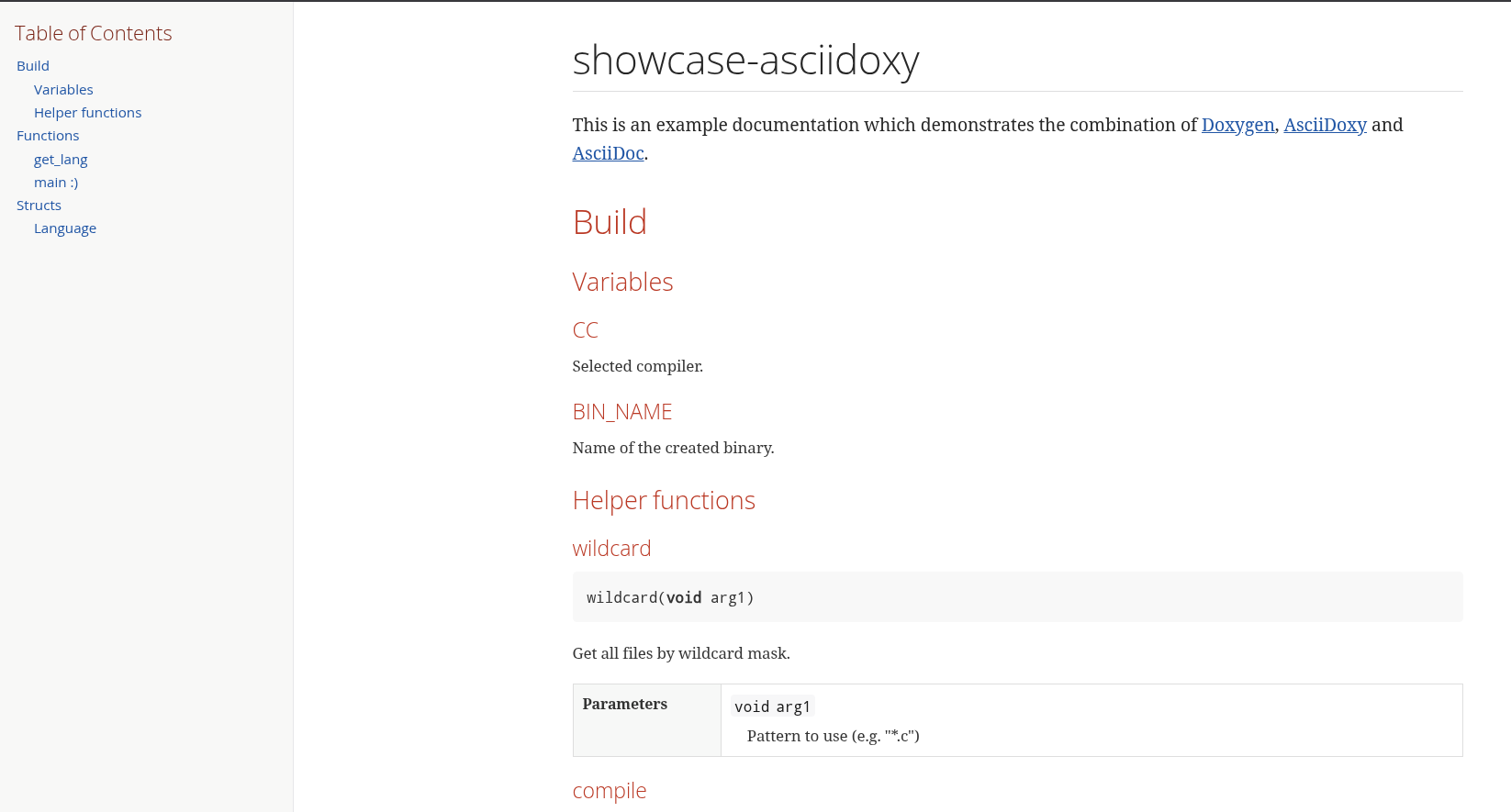
Conclusion &
Shellscripts are usually tiny utilities and small helpers, but more often than not they molt to backbones of businesses and have to should be documentated[6].
Doxygen offers greats ways to include all kind of informationen and with the addition of filters allows us to parse even - well - shellscripts. Bundled with AsciiDoxy we can even reach next level and create really fancy documents for whatever purpose. Create some throw-away PDF or throw it onto the Confluence pile of shame.
All examples can be found here: